Separate the symbol modules from the full image grid
DENSO WAVE specifies a four-module quiet zone on every side of a standard QR Code. This example has 25 symbol modules per side; adding the margins gives 25 + 4 + 4 = 33. The margin is outside the data grid but contributes to the saved image dimensions.
Moyoutil divides the limit by the full grid width and rounds down to an integer scale. Floor(1024/33) is 31, so 33 × 31 = 1023px. With the same content and settings, a 512px limit produced 495px, and 2048 produced 2046px. We checked actual function outputs, rendered the saved SVGs and decoded the URL with an independent reader.
25 + 4 + 4 = 33
512:  floor(512 / 33)  = 15; 33 * 15 = 495px
1024: floor(1024 / 33) = 31; 33 * 31 = 1023px
2048: floor(2048 / 33) = 62; 33 * 62 = 2046px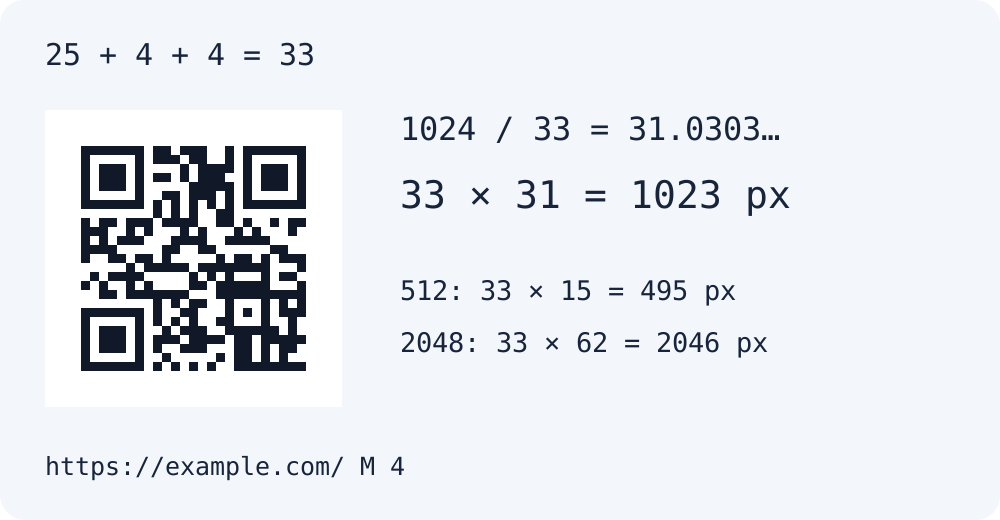
Check these settings before forcing a different size
Changing the data, correction level or margin can change the grid or scale, so these numbers do not apply to every QR Code. DENSO WAVE explains that the required version depends on data amount, type and correction level. Check the actual dimensions in your generated result.
Generate the same URL with the stated settings, then download PNG or SVG. Integer scaling is this generator’s output method, not a scanning guarantee. Resampling to an arbitrary size in another editor can blur module boundaries. Even with SVG, keep the quiet zone intact and scan the final screen or printed piece with the device you plan to use.
Successful independent decoding here applies to these fixed inputs and test renders. It is not a success-rate measurement across all cameras or print conditions. Moyoutil does not check scan statistics or whether the destination URL is reachable.
Frequently Asked Questions
Does a larger output size change the encoded content?
With the same content, level and margin, this example retained the same matrix and changed only the pixel scale. Scan the downloaded final file again to verify its URL.