The same bytes, different alphabets
Standard Base64 in RFC 4648 uses + and / for values 62 and 63; Base64url uses - and _. The text ??? becomes Pz8/ in the standard format and Pz8_ in the URL format. >>> becomes Pj4+ and Pj4-. Moyoutil’s text Base64 tool restores the standard strings but rejects strings containing - or _ with a format error. The Node.js code below independently reproduces both formats.
for (const text of ["???", ">>>"]) {
  const bytes = Buffer.from(text, "utf8");
  console.log(bytes.toString("base64"),
              bytes.toString("base64url"));
}
// Pz8/ Pz8_
// Pj4+ Pj4-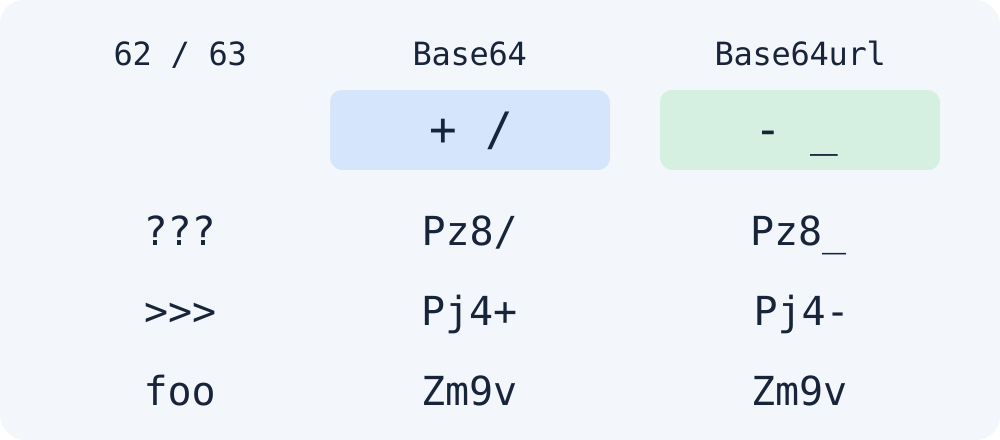
Do not identify the format by appearance alone
foo becomes Zm9v in both formats. The absence of +, /, -, and _ does not establish that a string is standard Base64. Check the format specification of the system that produced it. Padding is a separate rule: RFC 4648 requires padding unless a referring specification says otherwise, while RFC 7515 defines JWS Base64url with trailing = omitted. For example, f becomes Zg== in standard Base64 and Zg in the unpadded URL format.
for (const text of ["foo", "f"]) {
  const bytes = Buffer.from(text, "utf8");
  console.log(bytes.toString("base64"),
              bytes.toString("base64url"));
}
// Zm9v Zm9v
// Zg== Zg
Moyoutil does not automatically convert Base64url or verify JWS signatures. This code compares formats. Obtaining readable text does not establish signature validity. JWS signing input contains the original encoded header and payload, so do not replace signature-verification input with a re-encoded version.
Frequently Asked Questions
Can I delete - and _ to decode a string?
Do not delete them. They are data characters representing values 62 and 63. Removing them can change the original data. If you need the standard Base64 accepted by this tool, export that format from the original system.