Equal lightness, different relative luminance
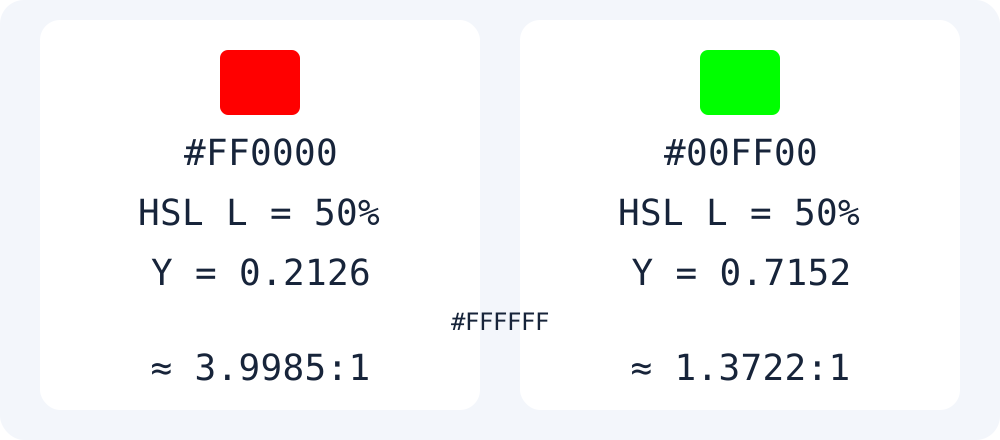
Entering #FF0000 and #00FF00 in Moyoutil’s color converter produces hsl(0, 100%, 50%) and hsl(120, 100%, 50%). Both have 50% HSL lightness, but their WCAG sRGB relative luminance values are 0.2126 and 0.7152. HSL lightness and relative luminance are different quantities. CSS Color 4 also explains that HSL lightness is not a visually uniform scale.
Do not simply average the RGB channels
WCAG divides 0–255 channels by 255, linearizes them, and weights R, G, and B by 0.2126, 0.7152, and 0.0722. Contrast is (L1 + 0.05) / (L2 + 0.05), using the relative luminance of the lighter and darker colors. Against white, red is about 3.9985:1 and green about 1.3722:1. Display values are rounded to four decimal places; do not use rounded values to decide conformance.
The code below is a separate reproduction example. Moyoutil’s color tool converts HEX, RGB, and HSL; it does not report contrast ratios or WCAG conformance. Check foreground and background colors together in your actual design. Transparency, images, and gradient backgrounds are outside this opaque, solid-color example.
const linear = n => {
  const s = n / 255;
  return s <= 0.04045 ? s / 12.92
    : ((s + 0.055) / 1.055) ** 2.4;
};
const luminance = rgb => {
  const [r, g, b] = rgb.map(linear);
  return 0.2126*r + 0.7152*g + 0.0722*b;
};
const contrast = (a, b) => {
  const x = luminance(a), y = luminance(b);
  return (Math.max(x,y)+0.05)
       / (Math.min(x,y)+0.05);
};
console.log(contrast([255,0,0], [255,255,255]).toFixed(4));
console.log(contrast([0,255,0], [255,255,255]).toFixed(4));
// 3.9985
// 1.3722Frequently Asked Questions
Does one contrast ratio establish full accessibility?
No. This article only calculates contrast between two opaque colors. Check criteria for text size and context, as well as other accessibility requirements, separately.