The first limit reached determines the output
The official PDF.js example explains rendering dimensions using a scale-1 viewport and a scale factor. Moyoutil applies the calculation below to that viewport and rounds down to whole pixels. Examples assume default page units and no rotation. Different CropBox, rotation or user units can change the viewport itself.
scale = min(DPI / 72,
            3072 / max(width, height),
            sqrt(8000000 / (width * height)))
outputWidth  = floor(width * scale)
outputHeight = floor(height * scale)
A 2000×1000 input produced 3072×1536px at both 144 and 216 DPI: the long-edge limit reduced the scale to 1.536. A 3000×3000 input produced 2828×2828px at every setting. Here the eight-million-pixel cap applies first; the rounded result contains 7,997,584 pixels.
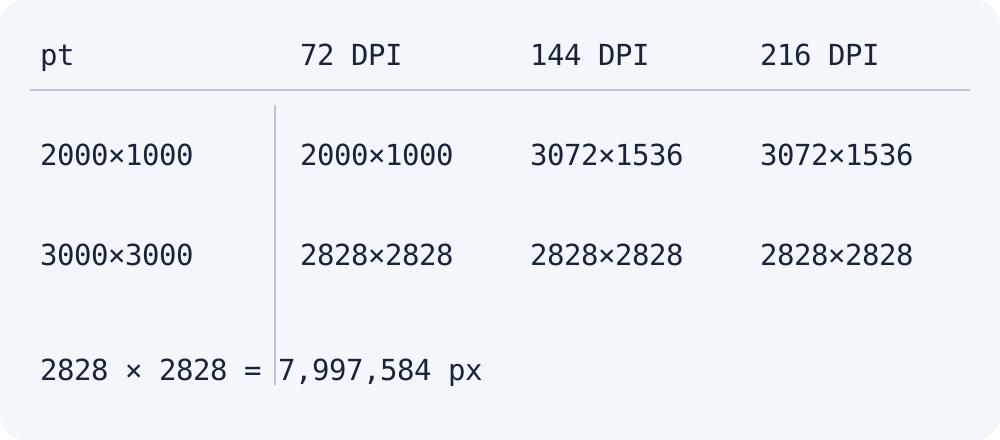
Check the result before choosing the next step
A 612×792 input grew to 612×792, 1224×1584 and 1836×2376px at 72, 144 and 216 DPI without hitting a limit. DPI is not always ignored. For large pages, check the downloaded image’s actual dimensions. This calculation does not establish matching print-DPI metadata in the saved file.
Keep the original PDF if you need more detail in a large drawing, and consider a tool that can work on a selected page region. Moyoutil PDF splitting separates pages; it does not crop regions within a page. Image compression does not remove this converter’s pixel cap.
Frequently Asked Questions
Does choosing PNG avoid the limit?
No. This tool applies the same size calculation before saving PNG or JPEG. File format and pixel limits are separate settings.