Understand the settings, follow worked examples, and try the tools yourself.
Document/PDF
Articles:
No articles match. Try another search or browse all articles.
Newest articles first
 Document/PDF
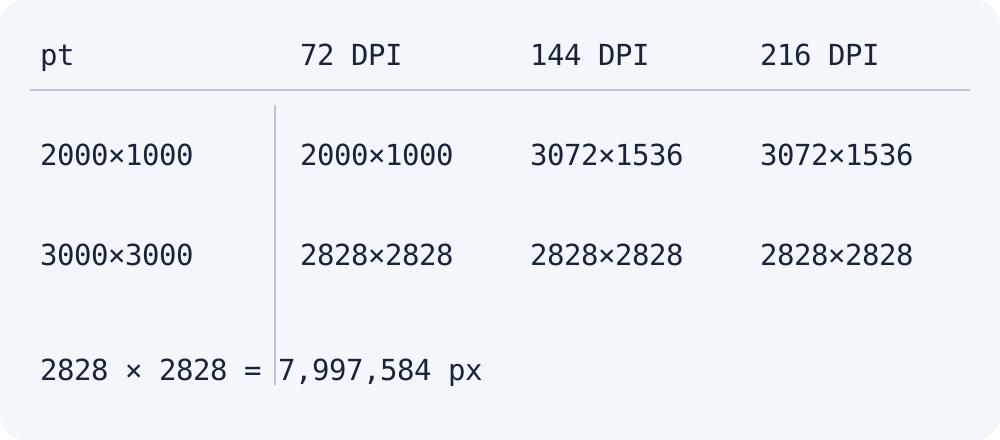
PDF Image Limits: Why Higher DPI Can Produce the Same Pixel Size
Check how Moyoutil applies a 3072px long-edge limit and an eight-million-pixel cap when converting PDF pages to PNG or JPG.
Read the articleDocument/PDFHow to merge and split PDF: Change page order and extract necessary pages
Instructions on how to merge multiple PDF files into one and extract the required pages in a range such as 1,3-5. Please check the ZIP format for one page at a time and the limit on form/signature documents.
Read the articleDocument/PDFConvert PDF to JPG·PNG: DPI·pixel size·image quality differences
Explains the procedure for converting PDF pages to PNG·JPEG and the differences between 72·144·216 DPI. Check for loss of text selection, scan resolution and ZIP save limits.
Read the articleDocument/PDFConvert JPG and PNG to PDF: Page Order, A4, US Letter and Image Quality
Combine images into a PDF, choose A4 or US Letter, set orientation and margins, and compare JPEG and PNG image settings.
Read the articleDocument/PDFRotate and save PDF pages: How to rotate only some pages 90 or 180 degrees
Explains how to rotate the entire PDF or only selected pages and save it as a new file. Check the differences between page numbers, existing and additional rotations, and scan deskew correction.
Read the article